
Intro
In the modern era of AI coding, “AI game generation”, DLSS 5, Unreal Engine 5, and phenomenal Gaussian Splat demos, people tend to think graphics and games are solved problems. “Just grab AI and start building games within days,” they say. Obviously that’s bullshit. The hard engineering work, knowledge, tradeoffs, and art direction are not going anywhere. Whether your game is 2D or 3D, realistic or cartoonish, set in a closed Mars base or an open-world zombie-infested New York, you still need to optimize it. One of the most important optimizations every game has used, and will keep using, is culling.
Good news: almost 80% of the optimizations I’ve seen over my career boil down to “don’t do extra stupid work when you don’t need to.”
Bad news: you still need to implement culling while balancing scene structure, game design, art direction, hardware limits, and performance budgets.
So this article walks through the main culling techniques used in modern real-time renderers. I’ll group them by category so it’s easier to see how they relate to each other. Almost every one of these techniques deserves its own article, because as always, the devil is in the details.
1. The Basics: Distance, Backface, and Frustum
These are the cheapest and most universally applied techniques. They catch the obvious cases before anything more expensive runs.
Distance Culling
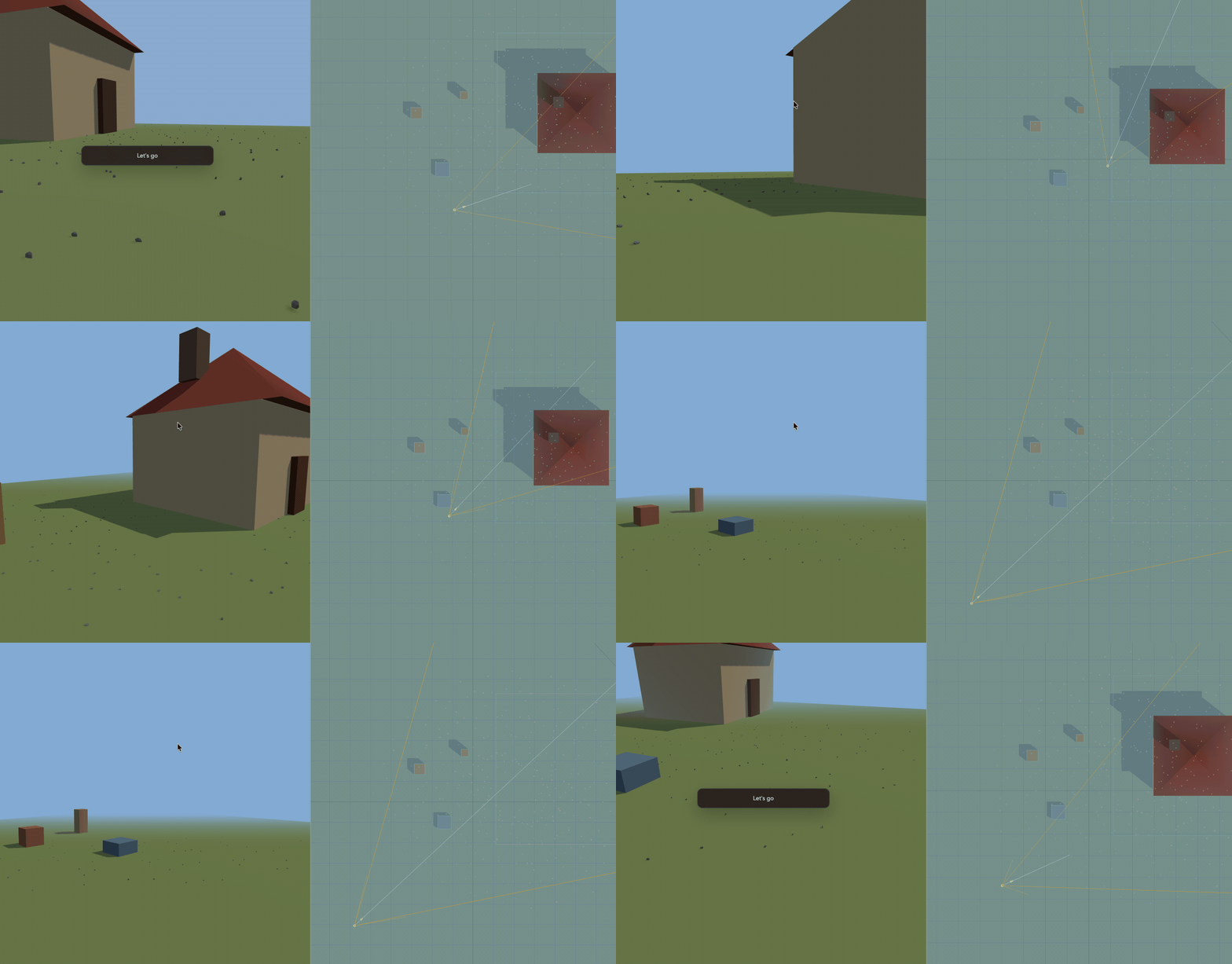
The simplest form: if an object is farther than some max distance from the camera, skip it. That’s it.
This is trivially fast and works well for small props where the visual impact of disappearing is minimal. Most engines let you set a cull distance per mesh or per material.
The tricky part is avoiding visible pop-in. Common mitigations are dithered fade-out, aggressive LOD before the cull point, or impostors (billboards that replace the real mesh at distance).
This is covered in more detail in the Screen Size Culling section below, but it’s worth flagging here: if something projects to only a handful of pixels, it’s often not worth the cost to draw. Distance alone doesn’t catch that cleanly - you also want a screen-space size check.
Backface Culling
This is the first culling technique you’ll usually encounter when working with a graphics API because it’s configured as part of the pipeline state object (PSO) and is one of the easiest wins to enable.
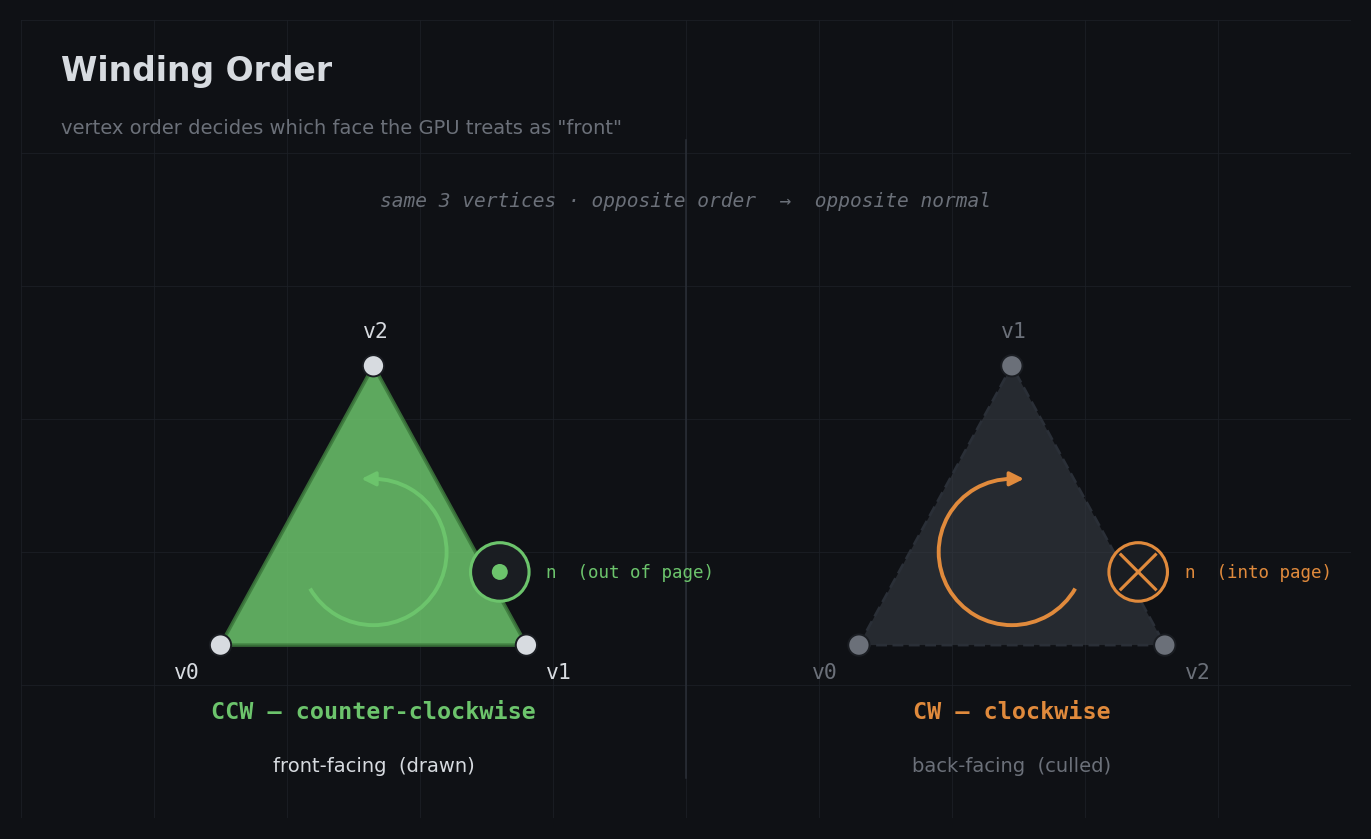
Every triangle has a front face and a back face. For closed meshes, back faces are never visible because they’re inside the object. The GPU can automatically skip them based on winding order, which saves roughly half the rasterization and fragment work for typical geometry.
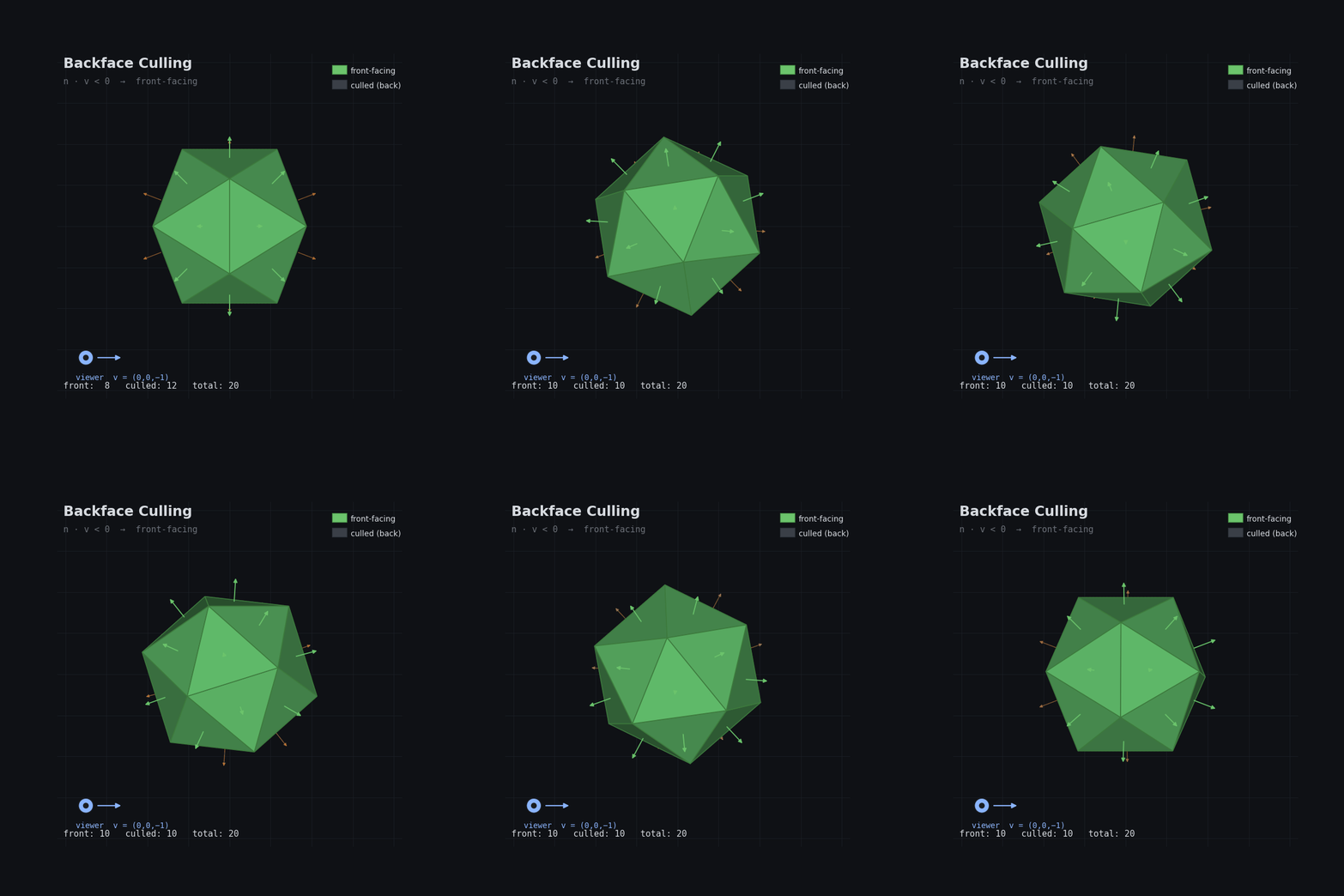
One thing worth knowing: in a traditional vertex + fragment pipeline, backface culling happens after the vertex shader has already processed the vertices. So you don’t save vertex work, only rasterization and fragment work. In more GPU-driven pipelines, you can move this decision earlier, for example in compute or task/amplification work that culls meshlets before they ever reach rasterization.
This is mostly free, but it’s worth understanding because it interacts with transparency, two-sided materials, and some culling algorithms that exploit it explicitly.
Frustum Culling
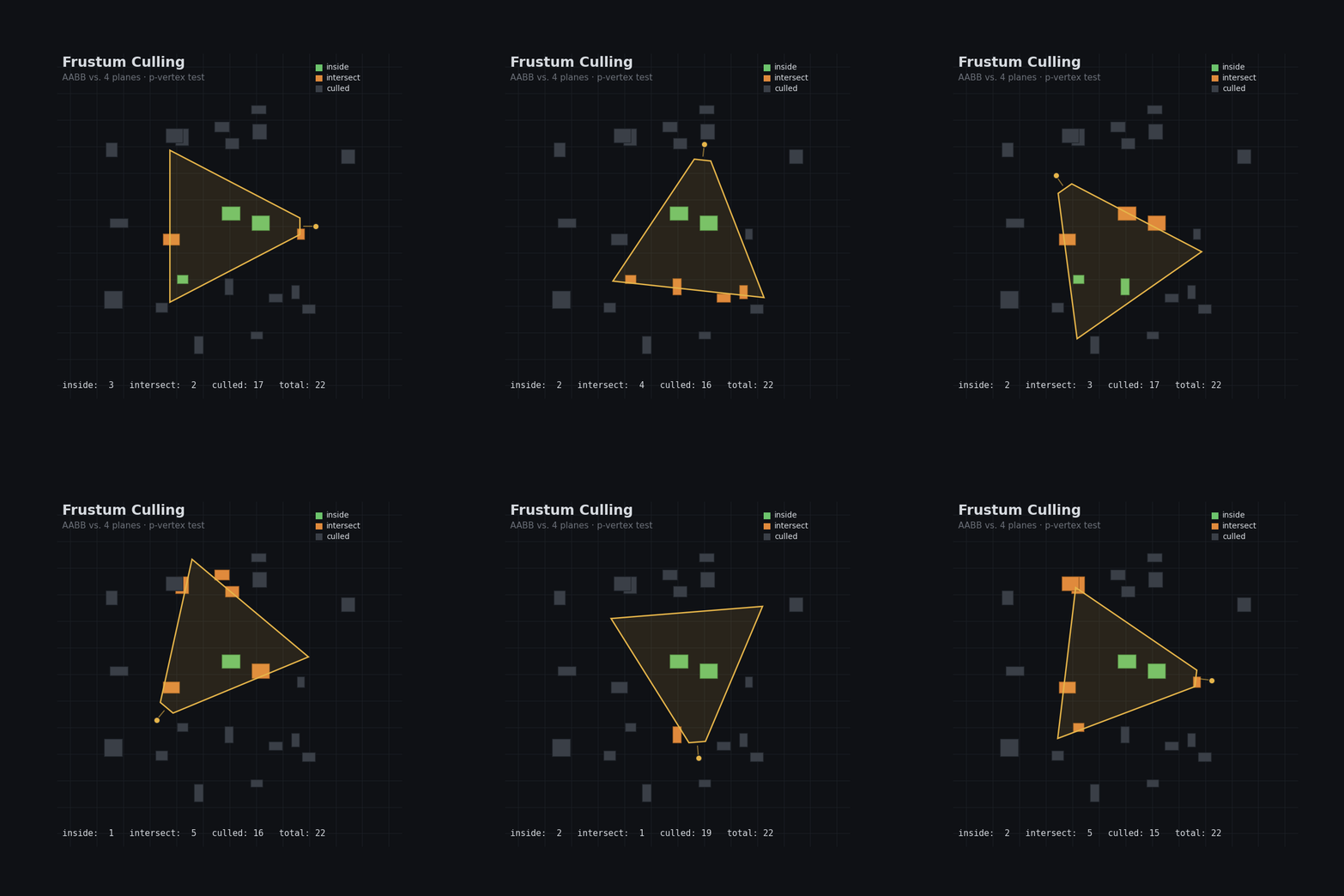
For a perspective camera, the view frustum is the truncated pyramid-shaped volume that represents what the camera can see. Anything outside of it doesn’t need to be rendered. Frustum culling tests objects, usually via bounding volumes like spheres or AABBs, against the six planes of the frustum and skips anything that doesn’t intersect.
This is almost always the first pass in a culling pipeline, or second after distance culling. It’s fast, cheap, and can cut a huge chunk of the scene in one shot, especially in open worlds where large portions of the map are behind or beside the camera.
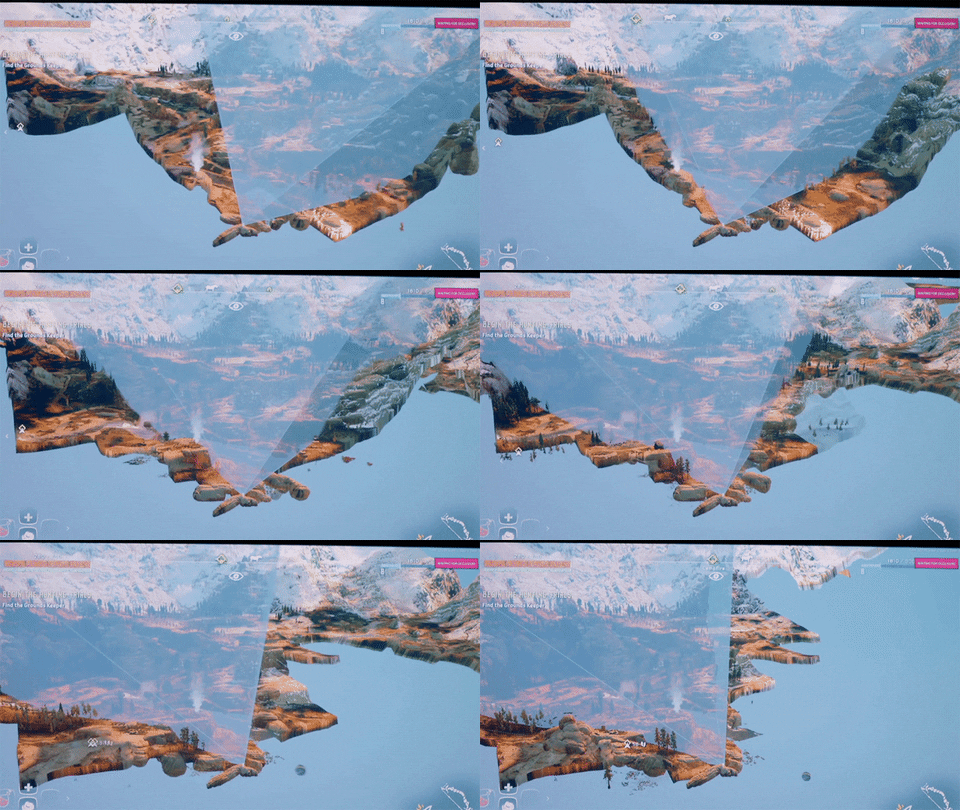
Notice in the gif above that big objects like mountains are still rendered even when they’re almost outside the frustum. This is the core tradeoff with object-level culling: many small objects give you fine-grained culling opportunities but each one is a draw call and a CPU-side visibility test. A handful of large objects is cheap on draw calls, but you’re stuck rendering the whole thing even when 90% of its triangles are offscreen - and you pay vertex shader cost for all of them, since the rasterizer clips after vertex shading, not before. That wasted vertex work on off-screen geometry is exactly the problem meshlet culling in section 4 solves.
2. Occlusion Culling
Occlusion culling tells you what’s behind other things. It’s harder but often gives you the biggest win in dense scenes like cities or interiors.
Hardware Occlusion Queries
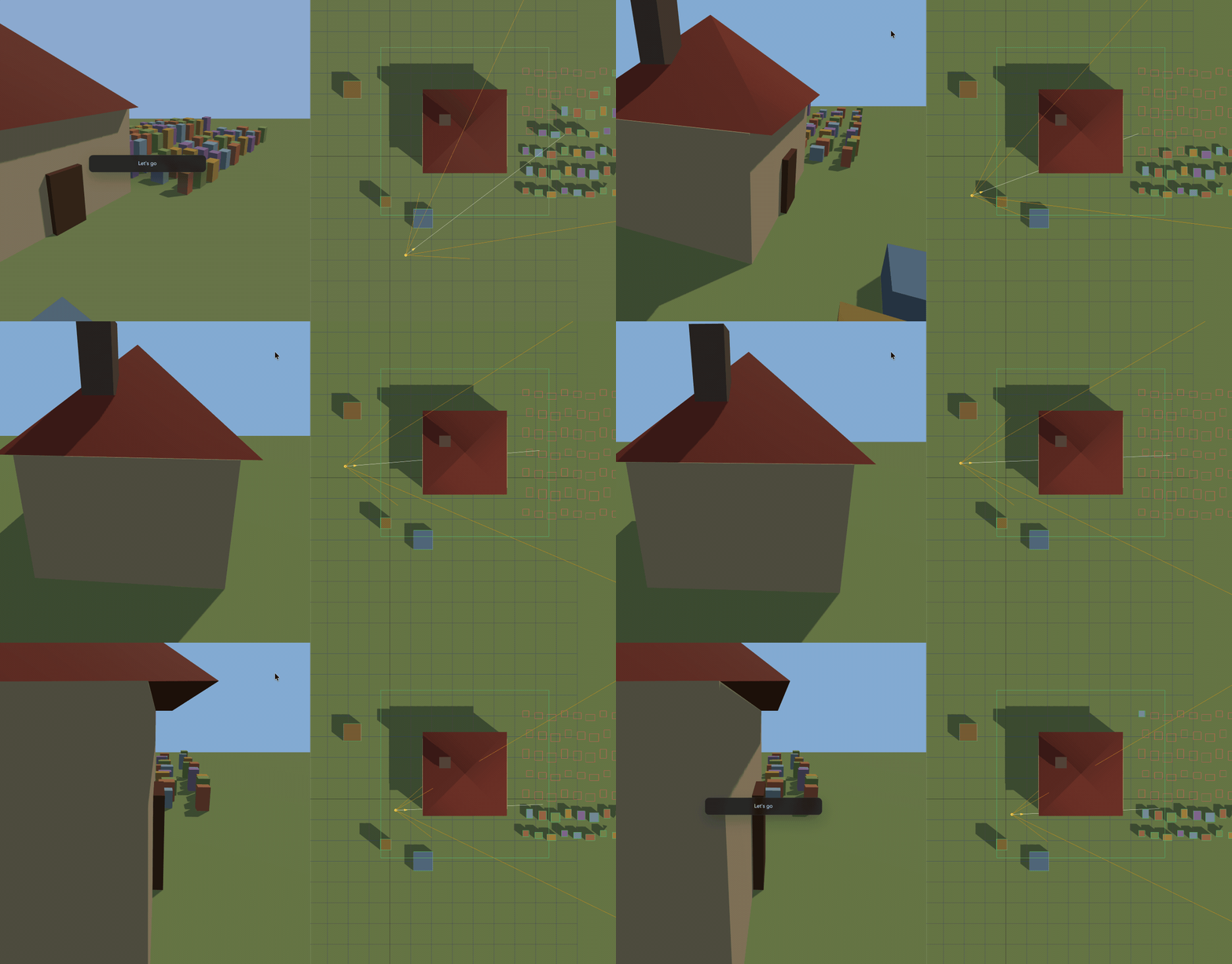
All major graphics APIs expose occlusion-query-style features. Direct3D 12 has query heaps, Vulkan has occlusion queries, and Metal has visibility result buffers. The idea is the same: render proxy geometry, typically the object’s bounds, and count whether any samples passed the depth test. Zero visible samples means the proxy was fully occluded from that view, so the real object can usually be skipped.
In DX12 you’d use D3D12_QUERY_TYPE_BINARY_OCCLUSION which returns just 0 or 1 rather than an exact sample count - cheaper and enough for culling:
// setup (once)
D3D12_QUERY_HEAP_DESC desc = { D3D12_QUERY_HEAP_TYPE_OCCLUSION, objectCount };
device->CreateQueryHeap(&desc, IID_PPV_ARGS(&queryHeap));

// per frame - render proxy, wrap with query
cmdList->BeginQuery(queryHeap, D3D12_QUERY_TYPE_BINARY_OCCLUSION, objectIndex);
cmdList->DrawIndexedInstanced(...); // draw bounding box
cmdList->EndQuery(queryHeap, D3D12_QUERY_TYPE_BINARY_OCCLUSION, objectIndex);

// resolve to a readback buffer (still on GPU timeline)
cmdList->ResolveQueryData(queryHeap, D3D12_QUERY_TYPE_BINARY_OCCLUSION,
                          0, objectCount, readbackBuffer, 0);
The catch is latency and synchronization. Results only become visible to the CPU after the GPU finishes, so in practice you often read frame N’s results while rendering frame N+1. That one-frame lag is usually acceptable, but it can briefly keep rendering something that just became occluded, or skip something that just became visible.
Software Occlusion Culling (CPU)
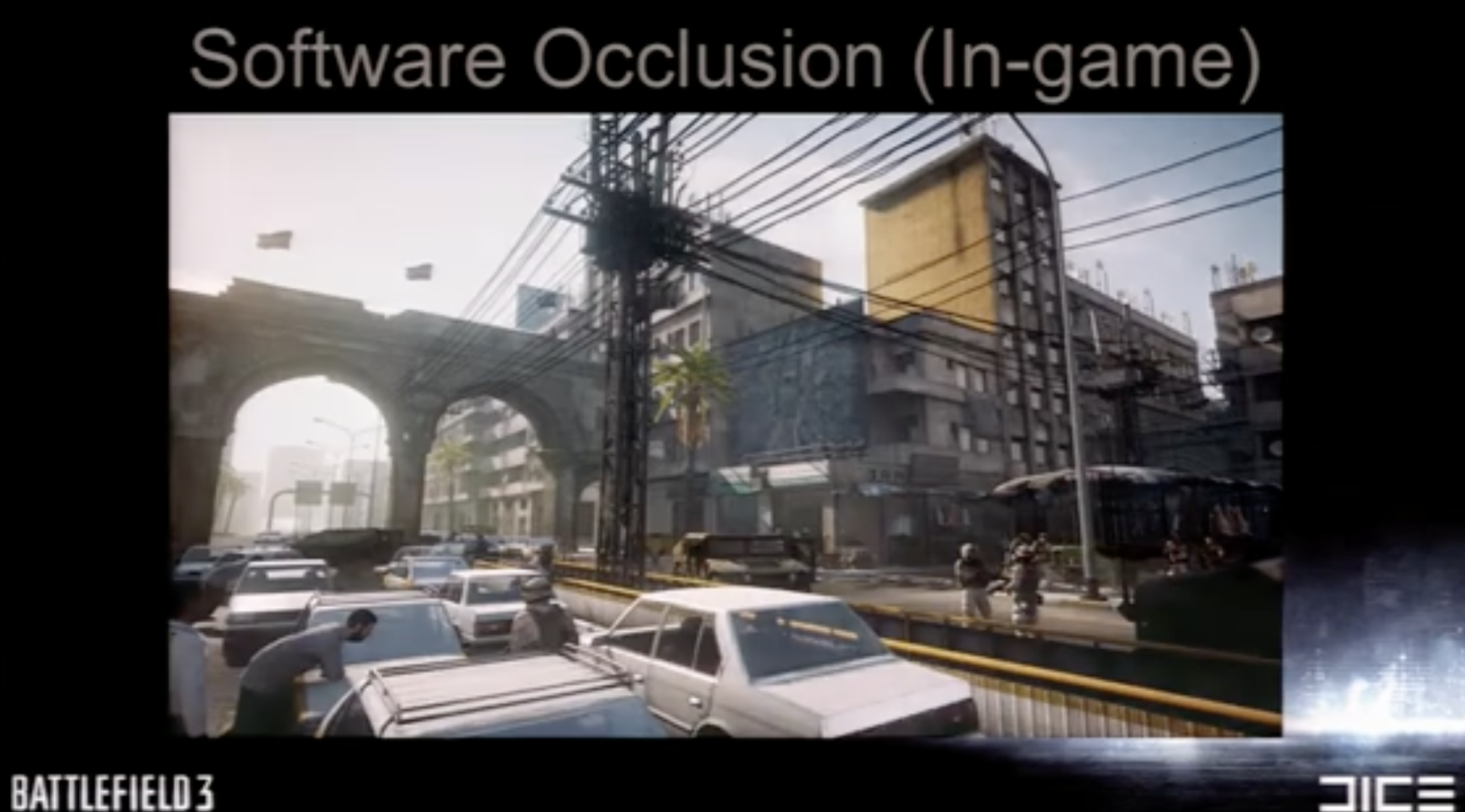
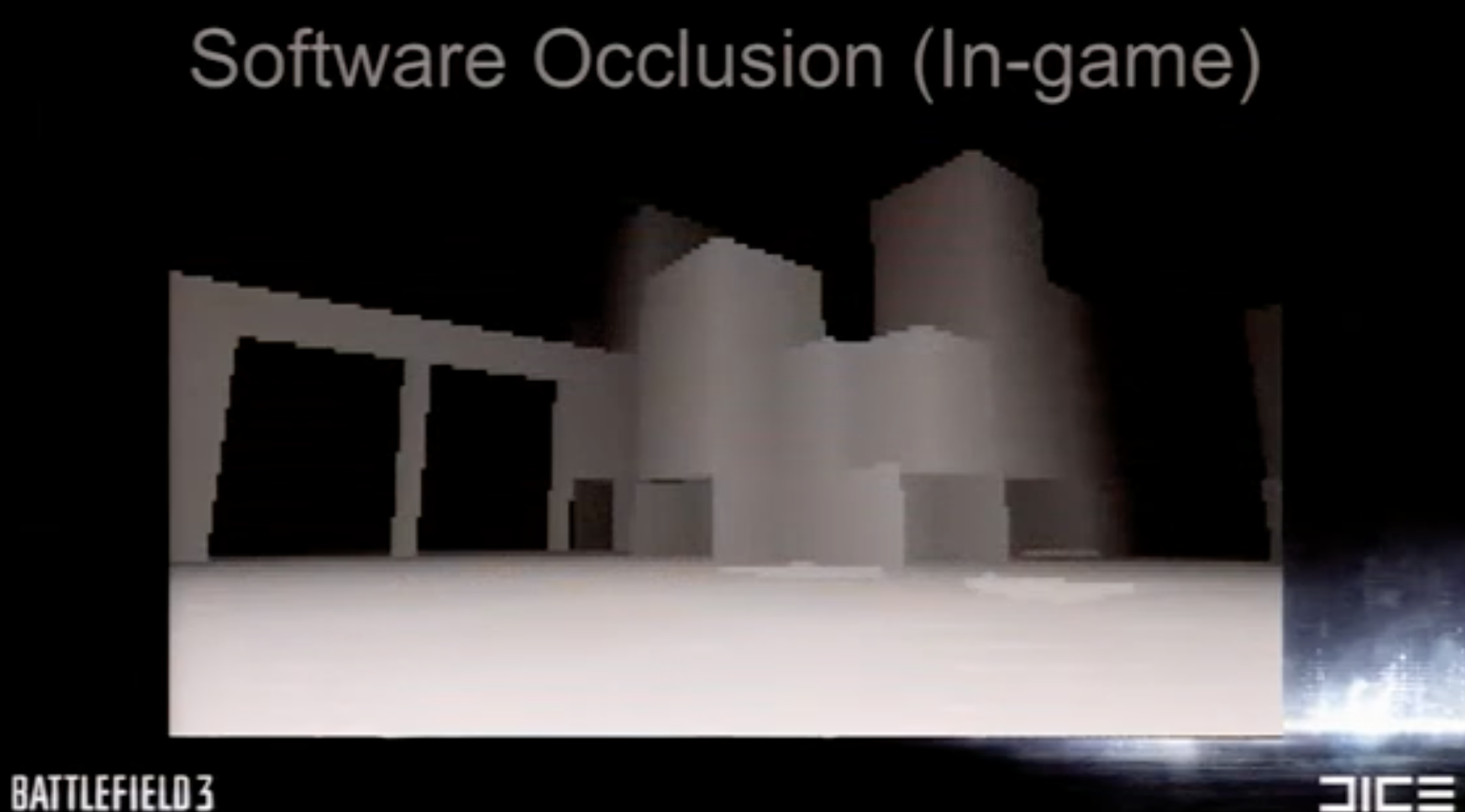
Instead of asking the GPU, you rasterize a low-resolution depth buffer on the CPU and test objects against it. Intel’s Masked Software Occlusion Culling (MSOC) is probably the most well-known implementation here. It uses SIMD to rasterize triangles in 8x4 pixel tiles and can process millions of triangles per second.
The upside is zero readback latency since it all happens on the CPU before you submit anything to the GPU. The downside is CPU cost and the need to maintain a separate simplified occluder mesh, since you can’t afford to rasterize your full scene geometry.
Hi-Z (Hierarchical Z-Buffer)
Hi-Z is a mip chain of the depth buffer, often called a depth pyramid, where each level stores a conservative depth value for a larger region of the screen.
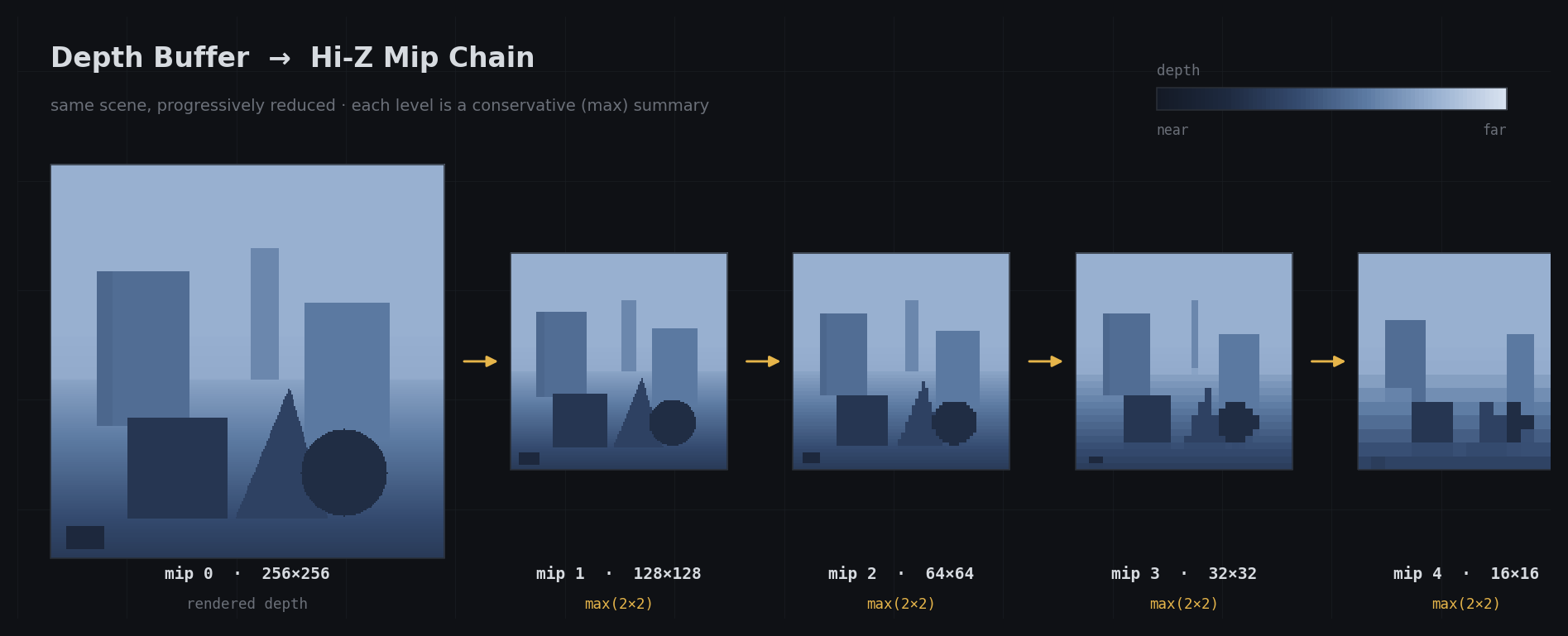
To test whether an object is occluded, you project its bounds to screen space, choose the mip level that roughly matches its footprint, and compare the object’s nearest depth against the pyramid. For a conventional LESS depth test this pyramid often stores the maximum depth in each region; with reversed-Z it is typically the minimum. The important part is that the representation stays conservative. If the test says “occluded”, you can safely skip the object. If not, you keep it. Good implementations prefer false negatives over false positives.
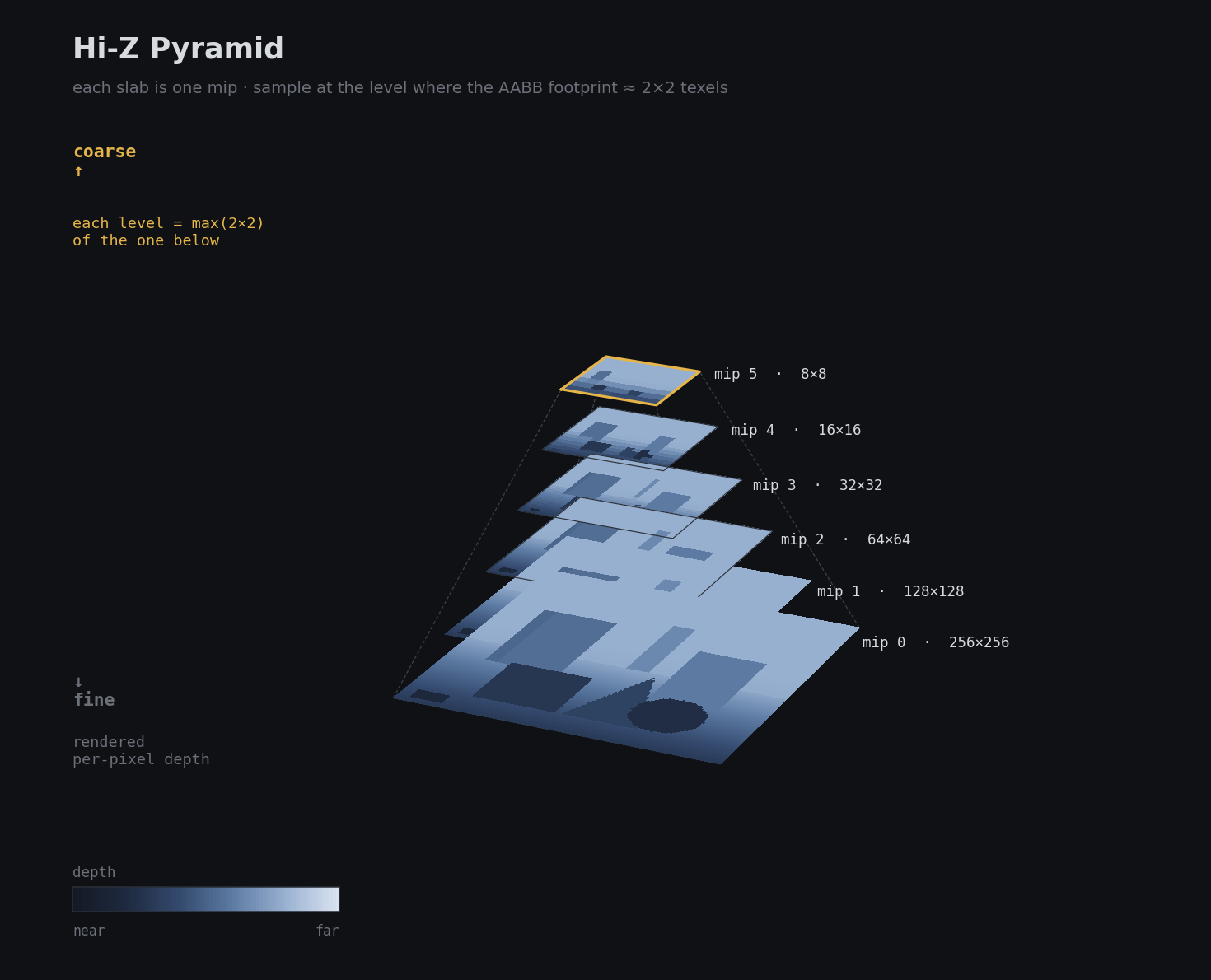
This is the basis for most GPU-driven occlusion culling today. It’s fast to build and query, and it lives entirely on the GPU.
Two-Pass Occlusion Culling
A common pattern in GPU-driven renderers: use the previous frame’s Hi-Z buffer to cull objects before rendering the current frame. Objects that were visible last frame render first and rebuild the Hi-Z. Then a second pass tests anything that was culled in the first pass, to catch things that just became visible.
This is the approach used by a lot of modern game engines. The one-frame lag is usually invisible in practice and the GPU-side cost is much lower than waiting for a full depth prepass.
There are many more optimization tricks here, but as I said before, I’m keeping this article intentionally short and shallow. I’ll add a few good references at the end if you want to dig deeper.
3. Even More Culling Techniques!
Screen Size Culling
Instead of a fixed world-space distance, you cull based on projected screen area. An object 10 meters away might be worth rendering, but the same object at 2000 meters might project to 3 pixels and not be worth the draw call overhead. Screen size culling handles this more gracefully than a raw distance threshold.
For example, Unreal uses screen size as the primary metric for static-mesh LOD transitions, while min/max draw distance are separate distance-based controls.
PVS (Potentially Visible Sets)
PVS precomputes for each region of the world which other regions can possibly be seen from it. At runtime you just look up the current region’s PVS and skip anything that isn’t in it. This is extremely fast at runtime but expensive to compute and doesn’t handle dynamic objects well.
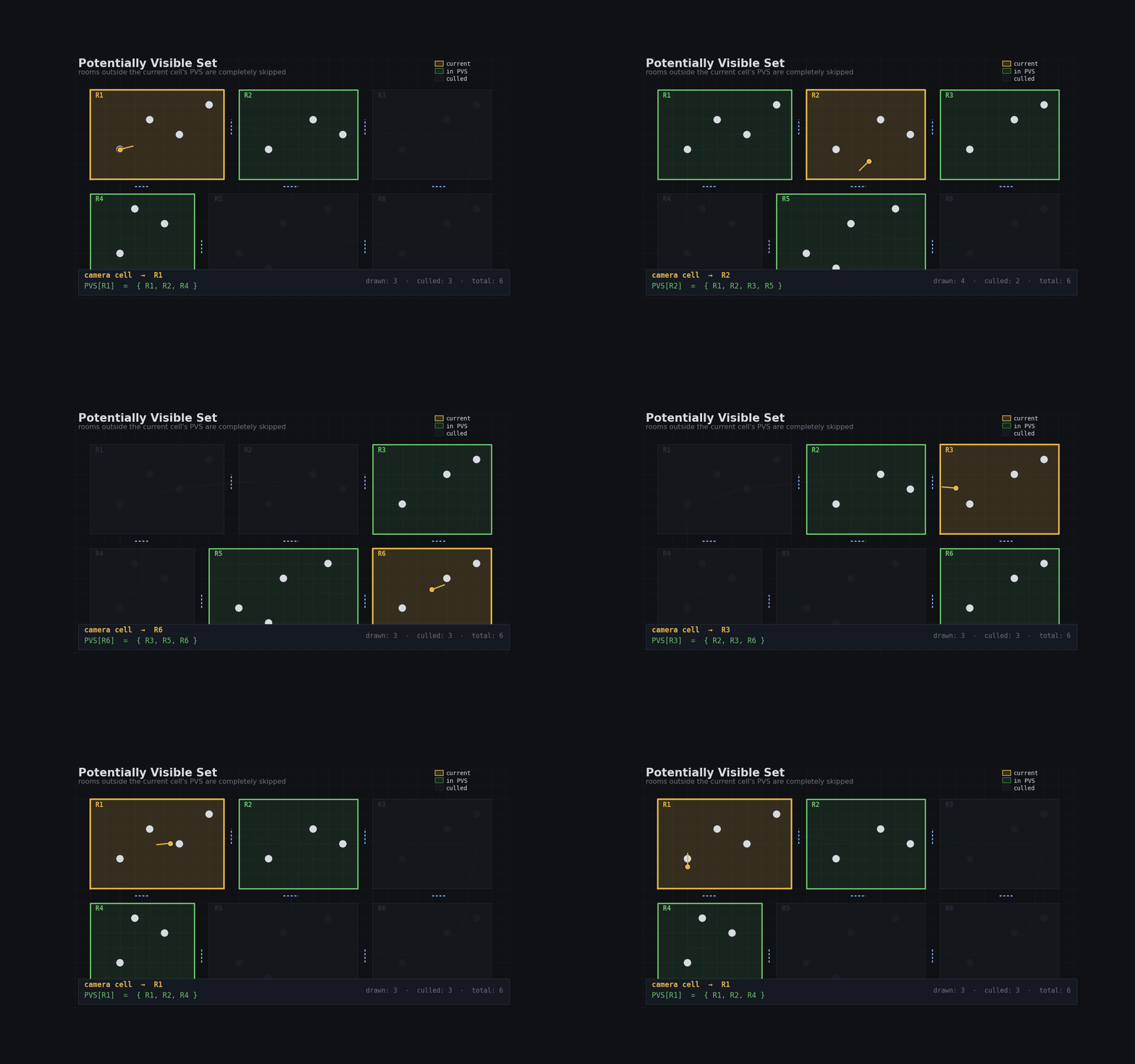
Quake made PVS famous. It’s still useful in some indoor games where the scene geometry is static and bake time is acceptable.
Portal Culling
For indoor scenes with well-defined rooms and doorways, portal culling is very effective. Each doorway is a portal. You trace the camera’s view through portals and only render rooms that are reachable through visible portals. This can eliminate entire rooms of geometry very cheaply.
Portal culling shows up in a lot of first-person games set in buildings. It complements frustum culling well since portals naturally shrink the effective view cone as you look through multiple doorways.
4. GPU-Driven Rendering and Cluster Culling
This is where things get interesting!
Instead of the CPU deciding what to draw and issuing one draw call per object, you push the culling logic onto the GPU and use indirect draw calls to let the GPU decide.
Indirect Drawing
DirectX, Vulkan, and Metal all support indirect drawing, although the exact API differs. The draw arguments, such as index count and base vertex, come from a GPU buffer rather than CPU code. A compute shader runs culling and writes only surviving objects into that buffer. Then one or a small number of indirect draws consumes that compacted list, so the CPU no longer loops over every visible object.
// compute shader - one thread per object
[numthreads(64, 1, 1)]
void CullCS(uint id : SV_DispatchThreadID)
{
    if (id >= g_objectCount) return;

    ObjectData obj = g_objects[id];
    if (!SphereInFrustum(obj.center, obj.radius)) return;

    uint slot;
    InterlockedAdd(g_drawCount[0], 1, slot); // atomic compact slot
    g_drawArgs[slot] = MakeDrawArgs(obj);    // write draw arguments
}
// CPU side - dispatch cull, barrier, draw
cmdList->Dispatch((objectCount + 63) / 64, 1, 1);
cmdList->ResourceBarrier(1, &CD3DX12_RESOURCE_BARRIER::UAV(drawArgsBuffer));
cmdList->ExecuteIndirect(cmdSig, objectCount, drawArgsBuffer, 0, countBuffer, 0);
InterlockedAdd packs surviving draws into a compact list. ExecuteIndirect takes the GPU-written count so it only processes what actually survived the culling pass.
Meshlet / Cluster Culling
Modern GPU-driven renderers can cull at the sub-mesh level, either in compute or in mesh/task/amplification shader stages. A mesh is split into meshlets, small clusters of triangles, often around 64-128 triangles each. Each meshlet has its own bounding sphere and a cone that represents the range of its triangle normals.
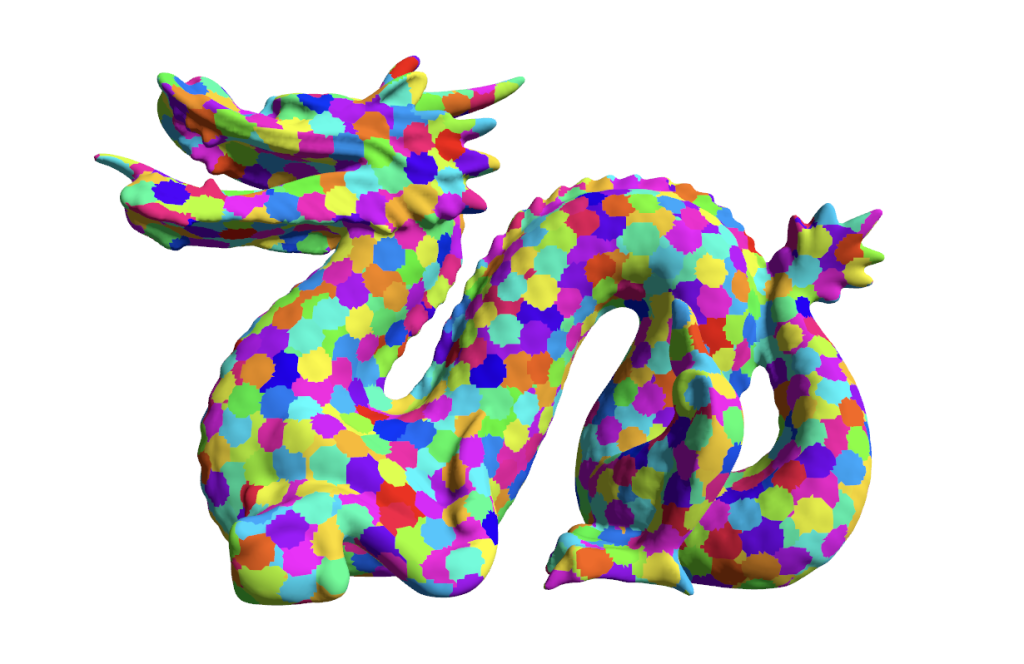
You can run frustum culling, occlusion culling, and backface culling on each meshlet independently on the GPU, which is much more precise than object-level culling. A big character mesh might have hundreds of meshlets, and only a fraction of them are visible from any given angle.
The normal cone is particularly clever. If all the normals in a meshlet point roughly the same direction, you can reject the entire meshlet with a very cheap cone-vs-view test. It’s basically backface culling at the cluster level.
5. Virtualized Geometry: Nanite
Nanite (Unreal Engine 5) is worth calling out separately because it combines several of the ideas above into one unified system. The goal is that you usually don’t author manual LOD chains. Instead, every mesh is stored as a hierarchy of clusters where coarser levels are produced by simplifying finer ones.
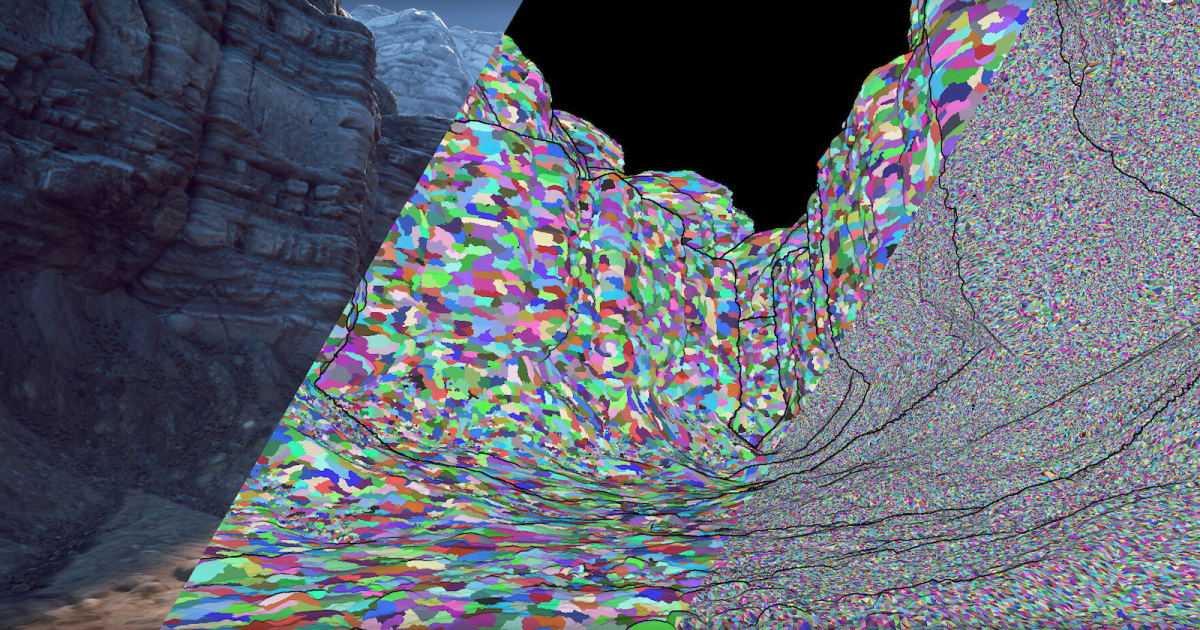
At runtime, that hierarchy is traversed on the GPU. Each cluster is tested for visibility and screen-space error. If a cluster is small enough on screen, it is rendered at that level of detail. If it’s too large, the system goes one level deeper. The important part is that cluster selection and culling happen on the GPU, which drastically reduces per-object CPU submission work.
The other key piece is the software rasterization path Nanite uses for very small triangles. Once triangles get tiny, the fixed-function hardware rasterizer starts carrying a lot of overhead per triangle. Nanite handles those cases with a custom software path while larger triangles still use hardware rasterization.
The result is that you can have scenes with billions of triangles where only the visible, appropriately-sized triangles actually get rasterized.
6. Light and Shadow Culling
Everything above focused on geometry, but lights and shadows have their own culling story, and in dense scenes they are often the bigger bottleneck. I won’t go deep here, just a quick blitz of the main ideas.
Tiled Light Culling (Forward+) - the screen is divided into 2D tiles and each tile records only the lights that overlap it, so shading reads a small local list instead of every light in the scene.
Clustered Light Culling - extends tiling into 3D by splitting the view frustum into clusters along the depth axis, giving much tighter light lists, especially in scenes with varied depth complexity.
Per-Light Screen and Depth Bounds - before shading or shadowing a light, you usually clip its influence to a screen-space rectangle, depth range, or light volume so you don’t spend time on pixels the light cannot affect.
Shadow Cascade and Shadow Caster Culling - each cascade of a CSM covers a different depth range, and each light has its own shadow frustum or volume. Geometry outside that region can be skipped entirely for that shadow pass.
Outro
Culling is one of those topics that looks simple from 10,000 feet and then turns into a pile of tradeoffs the moment you build a real renderer. The right answer is almost never a single technique. In practice, you stack them: distance and frustum culling first, some kind of occlusion next, then finer-grained systems like meshlet, light, and shadow culling where the content justifies the extra complexity.
The rule of thumb is simple: be conservative with correctness and aggressive with wasted work. A false negative just means you rendered a bit more than necessary. A false positive means something vanished in front of the player, and that is the kind of bug people notice immediately.
If you’re building a renderer from scratch, start with the boring wins first: good bounds, frustum culling, sensible LODs, and screen-size thresholds. Then profile. If dense interiors or cities dominate your frame, add occlusion. If CPU submission or vertex cost is the problem, go GPU-driven. If your content is absurdly dense and triangle-heavy, then cluster-based systems and ideas like Nanite start to make sense.
No silver bullet. Just layers of visibility tests, each cheaper than the work it removes. That’s rendering engineering in a nutshell.
Good luck, have fun!
Further Reading
- Inside Quake: Visible Surface Determination
- Direct3D 12 query types
- Efficient Occlusion Culling
- Hardware Occlusion Queries Made Useful
- ARM Hierarchical-Z Visibility Test sample
- Masked Software Occlusion Culling
- MaskedOcclusionCulling source code
- FidelityFX Single Pass Downsampler
- Direct3D 12 ExecuteIndirect sample
- A Deep Dive into Nanite Virtualized Geometry (SIGGRAPH Advances 2021)
- Clustered Deferred and Forward Shading